
Project Bronze Forever Controls, HUD, and HM Unlocks
How to move, battle, save, redeem codes, and unlock Cut, Fly, Rock Smash, Rock Climb, and Surf.
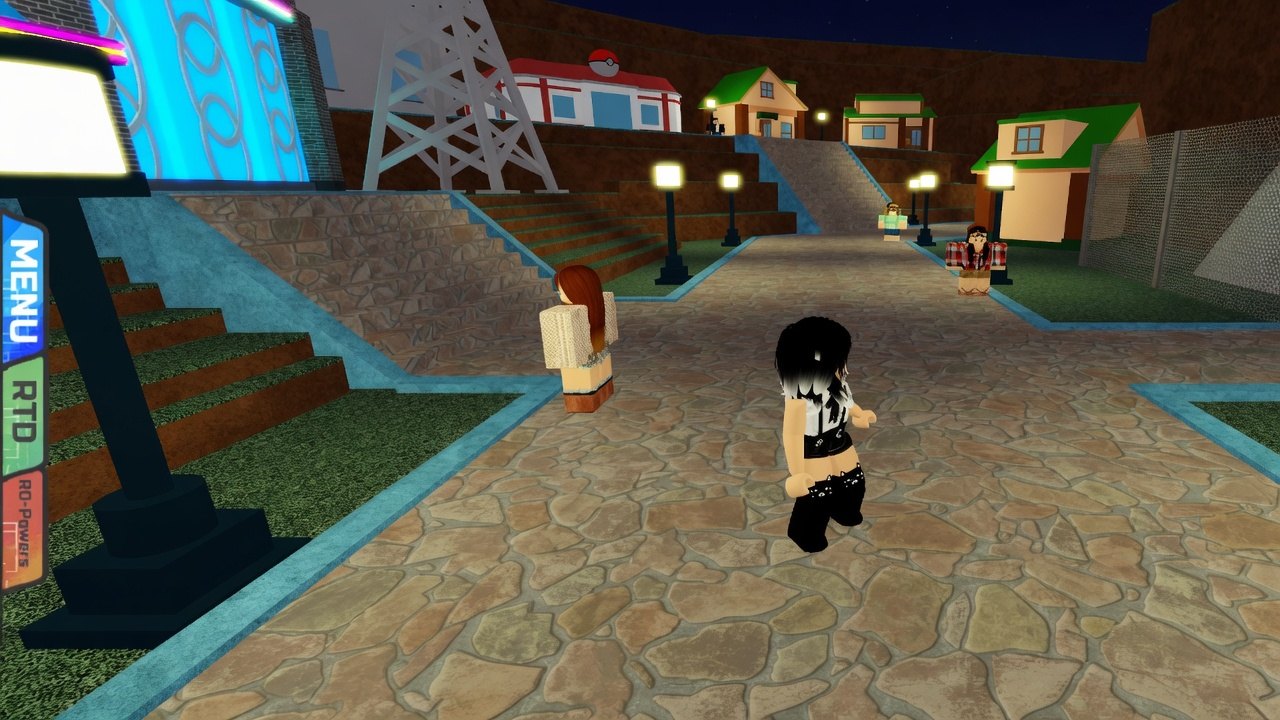
Project Bronze Forever plays like a 3D Pokemon RPG on Roblox, not like a keyboard-fighter. If you just left the red house in Mitis Town, this page is the input list, the left HUD, saving, and the HM badge gates. Story order is on Getting Started. The eight puzzles that actually grant those HMs are on the gym walkthrough. Play the current copy from the official play page; a missing HUD after a re-upload is usually the wrong place, not a broken save — check game status and Discord.
Movement on PC and mobile
On PC you click the ground to walk or use WASD. Camera drag is the usual Roblox look; you do not need a hidden run key to start the game. On mobile you tap the destination. That is the entire overworld scheme for Mitis, Route 1, Cheshma, and the later cities. If the character is not moving, you are probably in a menu, a dialogue, or a battle, not stuck on a broken WASD bind.
Interact with NPCs and doors by walking up and clicking / tapping them. The green healer in Mitis, the lab, the mart, and Jake are all ordinary talk targets. There is no separate “inspect” button on the HUD for those early scenes.
Battles are click menus
Once a fight starts, you pick Fight, Pokemon, Bag, or Run with clicks (or taps). Moves are a second click. There is no need to bind 1–4 to moves. That matters on mobile, where a WASD habit does nothing inside a battle. Use the type chart before you spam the first STAB on Linda’s Poochyena and Pancham or on Chad’s Electric gym; the UI will not warn you about immunities.
Wild encounters on Route 1 are the right place to learn the menus before gym puzzles add movement on top of battling. Catch with the balls Jake gave you; balls cost 200 at the mart if you empty the stack.
Left HUD: Menu, RTD, RO-Powers
The left side of the screen holds the persistent HUD.
Menu is always there. It is where you open the party, bag, Trainer Card, and the usual trainer screens after Cypress hands you a Pokedex and a starter. See starter Pokemon if you are still on that lab pick.
RTD appears after gym 1. Jake gives it when you beat Chad for the Arc Badge. Use it as the fast-travel tool the game grants at that point; it is not in Mitis on a fresh file.
RO-Powers is the code panel. It also shows up with the post-Silvent HUD. Paste working codes there; the step-by-step is how to redeem. If RO-Powers is missing, you have not finished Silvent yet, or you are on a copy that is not the live one.
Save, autosave, and one-chance fights
Open Options for Save and autosave. Use Save on purpose in Mitis, before gym puzzles, and before every legendary. Autosave is convenient for the story and dangerous for set encounters. For legendary birds and the Regi trio the rule is the same: save, turn autosave off, then start the fight. Dusk Balls and Quick Balls do not help if the game already wrote a faint. The same habit applies later to Volcanion, Rotom, and Victini.
Do not leave autosave off for the entire eight-gym story. Puzzles in Brimber, Rosecove, and Frostveil can drop you into lava, water, or a 2D pit; you want ordinary autosave while you learn those rooms, then switch it off only when a legendary is on the field.
HM unlock order (badge gates)
HMs are not found as random overworld discs in the first hour. They unlock with specific badges. You cannot Cut a tree in Mitis, and you cannot Surf to Crescent without gym 7.
Cut — after the Arc Badge (gym 1, Silvent, Chad, Electric). Nightclub dance-pad gym. TM57 Charge Beam. Traded Pokemon obey up to level 30.
Fly — after the Soaring Badge (gym 4, Anthian, Stephen, Flying). Hangar gym; you fetch three tools. TM40 Aerial Ace.
Rock Smash — after the Crater Badge (gym 5, Aredia, Prince Ryan, Ground). Palace and ruins. Mega on his last Pokemon. TM78 Bulldoze. Also the King’s Red Jewel. You need Rock Smash for a wall inside Frostveil Catacombs on the Regi route.
Rock Climb — after the Harvest Badge (gym 6, Fluoruma, Fissy, Grass). Greenhouse fruit-weight puzzle, full battle, mega, TM22 Solar Beam. Rock Climb beside Frostveil’s Pokemon Centre is how you drop into the catacombs.
Surf — after the Contrast Badge (gym 7, Frostveil, Zeek, Dark). This gym is a 2D platformer and is not Ice-type. TM97 Dark Pulse. Surf is required for gym 8 (Crescent, Captain B., Ghost, wrecked ship, Haunted Badge) and for water you will fish later.
Gym 8 makes all Pokemon obey. Three badges (through Rosecove) unlock More Adventures and Randomizer. Leader portraits live on gym leaders. Eclipse steps that gate Brimber and the Rosecove lighthouse are on Team Eclipse.
If an HM prompt does not appear, you are missing the badge, not a control bind. Clear the matching gym, then come back to the tree, rock, wall, or water. For the bird tickets you also need Fly to Port Decca after gym 4; that is a destination on legendary birds, not a new key.
Frequently Asked Questions
Quick answers trainers actually search for.
How do I move in Project Bronze Forever?
On PC, click-to-move or WASD. On mobile, tap the ground. Battles are separate click menus and ignore WASD.
Where do I redeem codes?
RO-Powers on the left HUD after gym 1. Follow how to redeem and paste the list from working codes.
When do I get Cut, Fly, and Surf?
Cut after the Arc Badge (gym 1), Fly after Soaring (gym 4), Surf after Contrast (gym 7). Rock Smash is gym 5, Rock Climb is gym 6. See the gym walkthrough.
Should I turn autosave off all the time?
No. Leave it on for story and gym puzzles. Turn it off only for one-chance hunts such as legendary birds and the Regi trio, after you save.
Why is RTD missing on a new file?
Jake gives the RTD after you beat Silvent Gym. It is not part of the Mitis HUD. If the whole HUD looks wrong, confirm the live copy on game status.